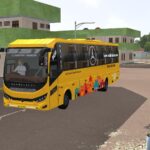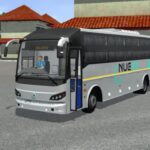

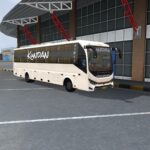
Mod Details
Prakash Capella Bs6 Sleeper Bus Mod Bussin By Simulation World
Type -
Paid
Price -
20 inr /- only
Category -
bus
Game Shots -
Info -
Total Downloads: 236
Total Comments: 0
Uploaded On: May 1, 2026
Total Likes: 349
Description -
🔵Features
1. Best and most realistic physics
2. Optimized 3d Model (Triangles – 182k)
3. Driver Door animation
4. Passenger door and inner door animation
5. Engine hood animation
6. Curtain animation
7. Interior lighting with low beam light
8. Ao Baked Texture
9. Made On Eicher Chassis
🔵Credit –
Conversion – Bus Simulation, Simulation World And Kalpesh
Author -
Simulation World, Kalpesh Kapure, Bus Simulation
Video -
How ton install Bussin Mods?
To install a mod in Bus Simulator India (BUSSIN), you generally need to download the mod file (usually ending in .bussidmod or .bussidvehicle) and move it into the game’s designated “Mods” folder using a file manager.
Step-by-Step Installation Guide
Download the Mod: Find a mod you like (bus, truck, or car)
Locate the File: Open a file manager app like ZArchiver and go to your Downloads folder to find the file.
Move the Mod File:
- Long-press the mod file and select Copy or Cut.
- Navigate to the internal storage folder named BUSSID.
- Open the Mods folder inside the BUSSID directory.
- Paste the file here.
Activate in Game:
- Open Bus Simulator India.
- Go to the MOD section on the main menu.
- If the mod isn’t showing, tap Import and select the file from your storage.
Use the Mod: Go to your Garage, scroll through your vehicles until you find the new mod, and tap Use.
Links -
Troubleshooting Tips-
- File Extension: Ensure the file ends in
.bussidmod. If it’s a.zipor.rarfile, you must extract it first to get the actual mod file.
- Folder Missing: If you don’t see a “BUSSID” folder, you may need to create it manually in your device’s “Documents” or main storage area after running the game at least once.
- Restart: If the vehicle doesn’t appear in the garage immediately, try restarting the game.